

Shopify CLI, GitHub and CI/CD — a professional theme workflow
How I run Shopify theme work in 2026 — Shopify CLI for local dev, GitHub for version control, and GitHub Actions for safe, automated deploys to live and staging themes.
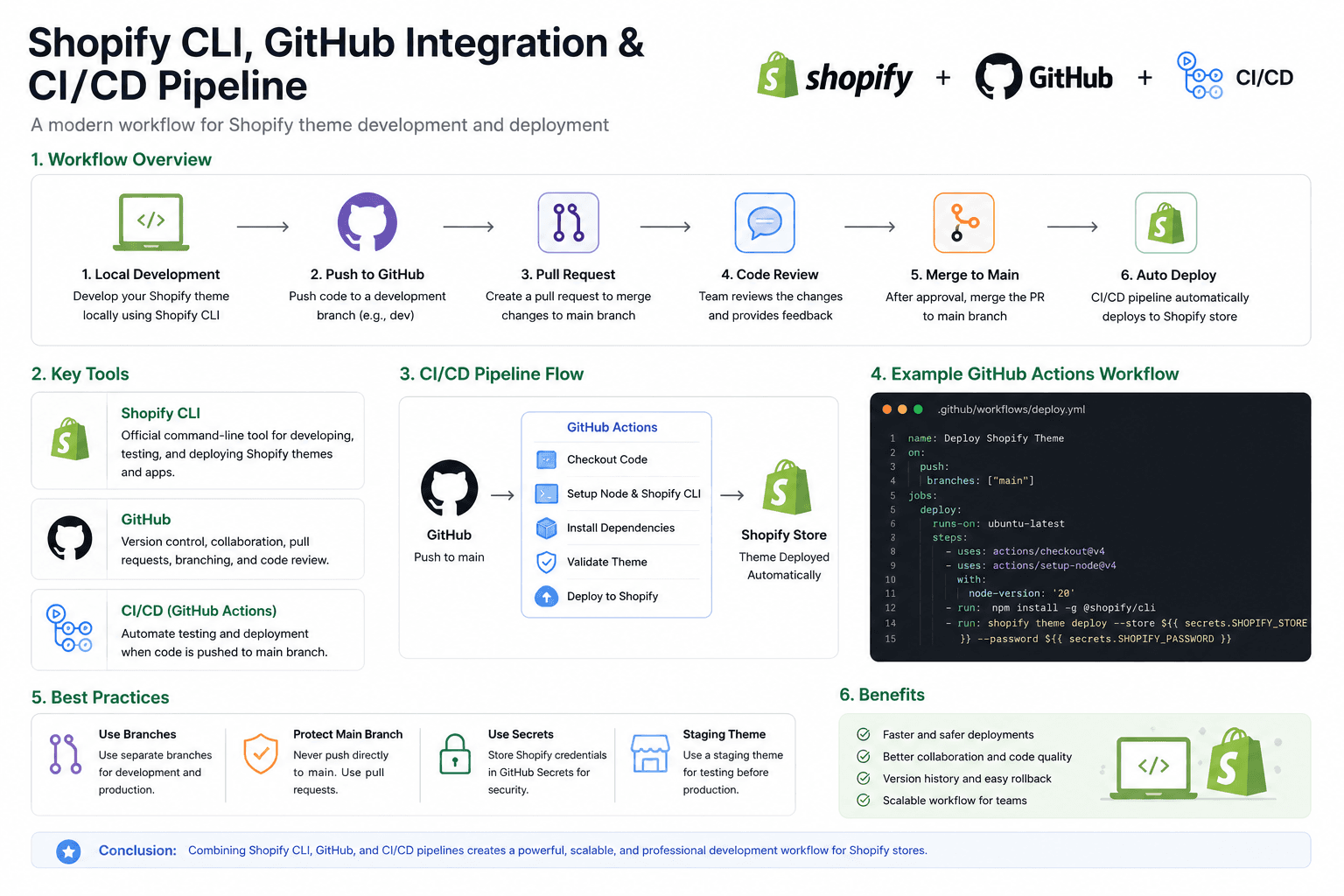
Editing themes through Shopify's online code editor is the fastest way to break a store at 4pm on a Friday. There's no diff, no review, no rollback. The modern workflow — and the one I use across every client store at Tuliptech — is Shopify CLI for local dev, GitHub for version control, and GitHub Actions for safe, automated deploys. This post is the end-to-end setup, including the deploy.yml I actually run.
The full pipeline at a glance
Every change flows through the same six-step pipeline. Local CLI runs hot-reload against an unpublished theme; GitHub holds the source of truth; pull requests get reviewed; only a merge to main ships to live.
- 01Local devshopify theme dev
- 02Feature branchfeat/*
- 03Pull requestpreview theme via CI
- 04Reviewdiff + visual QA
- 05Merge to mainprotected branch
- 06Auto deployshopify theme push --live
1. Shopify CLI — the developer experience
The Shopify CLI is the official tool for working on themes outside the browser. It gives you a hot-reload dev server, theme push / pull, schema validation and the ability to spin up unpublished themes for previews. A handful of commands cover 90% of day-to-day work:
# install the Shopify CLI once (Node 18+ required)
npm install -g @shopify/cli @shopify/theme

# log in and link your store
shopify login --store your-store.myshopify.com

# pull the live theme into a local working copy
shopify theme pull --live --path ./theme

# start a hot-reload dev server against an unpublished theme
shopify theme dev --store your-store.myshopify.com

# push a feature branch up as an unpublished staging theme
shopify theme push --unpublished --json --path ./theme

# promote a tested staging theme to live (use with care)
shopify theme publish --theme=THEME_ID2. GitHub — branching strategy that scales
The pattern that holds up across solo work and 5-developer teams is trunk-based with short-lived feature branches. main is always deployable; every change is a branch and a PR; preview themes are created automatically per pull request so designers can review on a real Shopify URL.
# branch off main for every change
git switch -c feat/product-variant-tabs

# work locally with hot reload
shopify theme dev

# commit small, named units of work
git add snippets/variant-tabs.liquid assets/product-template.css
git commit -m "feat(product): add variant tabs snippet and base styles"

# push and open a pull request
git push -u origin feat/product-variant-tabs
gh pr create --base main --title "Product: variant tabs + accordion"3. CI/CD — the GitHub Actions workflow I actually use
Two jobs, one file. On a pull request, push the branch as an unpublished preview theme so reviewers can click through it on the real store. On a merge to main, push to the live theme. Everything keyed off branch protection and secrets — no manual deploys.
# .github/workflows/deploy.yml
name: Deploy Shopify Theme

on:
  push:
    branches: [main]
  pull_request:
    branches: [main]

permissions:
  contents: read
  pull-requests: write

jobs:
  preview:
    if: github.event_name == 'pull_request'
    runs-on: ubuntu-latest
    steps:
      - uses: actions/checkout@v4
      - uses: actions/setup-node@v4
        with:
          node-version: 20
      - name: Install Shopify CLI
        run: npm install -g @shopify/cli @shopify/theme
      - name: Push preview (unpublished) theme
        env:
          SHOPIFY_CLI_THEME_TOKEN: ${{ secrets.SHOPIFY_CLI_THEME_TOKEN }}
          SHOPIFY_FLAG_STORE: ${{ secrets.SHOPIFY_STORE }}
        run: |
          shopify theme push \
            --unpublished \
            --json \
            --path ./theme \
            --theme="pr-${{ github.event.pull_request.number }}"

  deploy:
    if: github.ref == 'refs/heads/main'
    runs-on: ubuntu-latest
    environment: production
    steps:
      - uses: actions/checkout@v4
      - uses: actions/setup-node@v4
        with:
          node-version: 20
      - name: Install Shopify CLI
        run: npm install -g @shopify/cli @shopify/theme
      - name: Push to live theme
        env:
          SHOPIFY_CLI_THEME_TOKEN: ${{ secrets.SHOPIFY_CLI_THEME_TOKEN }}
          SHOPIFY_FLAG_STORE: ${{ secrets.SHOPIFY_STORE }}
        run: |
          shopify theme push \
            --live \
            --allow-live \
            --path ./theme
The secrets you need
Set these in GitHub → Repo → Settings → Secrets and variables → Actions. They're scoped to the repository and only injected into Actions runs, never visible in logs.
SHOPIFY_CLI_THEME_TOKEN— generated from Shopify admin → Apps → Theme access.SHOPIFY_STORE— your store handle, e.g.your-store.myshopify.com.
4. Best practices that pay off in month two
- Two stores — keep a long-lived staging store (development plan) wired to a
stagingbranch with its own deploy job. QA there before main. - Never push directly to
main— disable direct pushes in branch protection. Everything goes through a PR. - Pin the CLI version in CI (
npm install -g @shopify/cli@3.x) so a CLI release can't silently change deploy behaviour. - Add
shopify theme checkas a separate lint job — it catches deprecated filters, missing translations and performance smells before review. - Tag releases — when a PR ships, tag the commit (
v2026.05.25). Rolling back becomes one command. - Backup before risky changes — duplicate the live theme from the Shopify admin before any architectural change. It costs nothing and saves Fridays.
The result
With this setup, "ship a change to a Shopify store" becomes: branch, commit, open PR, review the preview theme on a real Shopify URL, merge, done. No more cowboy edits in the online editor, no more guessing what the last deploy changed, no more "who edited that snippet at 11pm?" — the diff and the deploy log answer it for you.
It's the same workflow modern engineering teams use for every other codebase. Shopify themes finally get to join the club.
Migrating WooCommerce to Shopify without losing SEO or conversions
The process I use to replatform a store from WooCommerce to Shopify — redirect mapping, data migration and the conversion work — the way I ran it for Stateside Distribution for a 20% conversion lift.
Blocking fraudulent orders with Shopify Flow
How I built a native Shopify Flow automation to catch high-risk and mismatched-address orders the moment they're placed — tag, hold fulfillment and review before anything ships.
Building a modern Shopify product template with variant tabs and a specification accordion
How to ship a premium product page in Shopify — variant tabs instead of dropdowns, a clean spec accordion, and the Liquid + CSS + JS split that keeps it maintainable.